Perxona Service API Overview #
This document provides an overview of the Perxona Service APIs, which are designed to power the core functionalities of your Perxona agent interactions. These APIs handle everything from initializing conversations and processing chat messages to managing agent profiles and voice services.
How to Access #
To access the Perxona Service APIs, you need to authenticate your requests using an API key. These credentials should be included in the headers of your API requests.
API Key Authentication (2 different keys) #
- Server Host:
https://console.perxona.ai/{region}- {region} includes
eu,asia
- {region} includes
Deployment API Key #
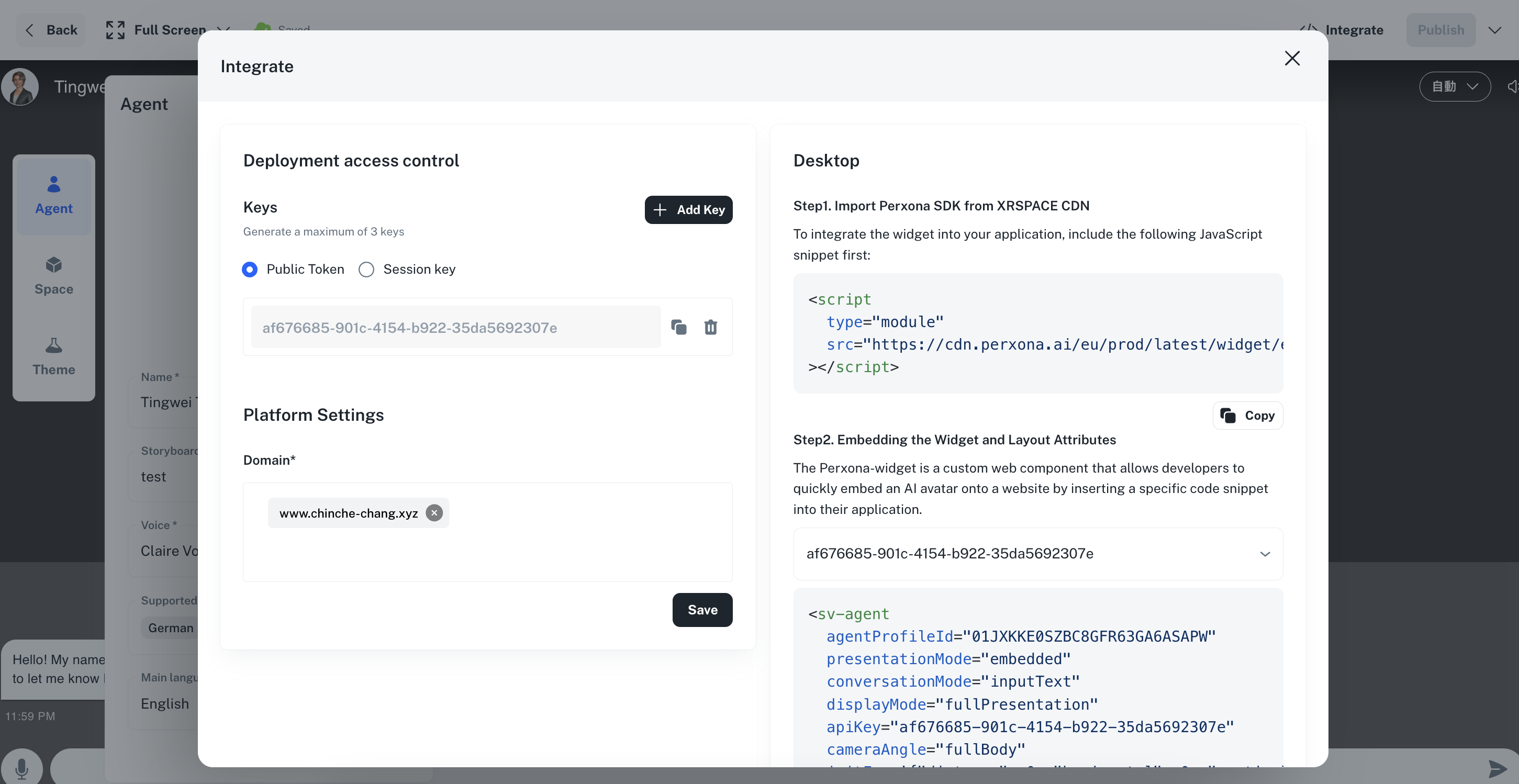
This key is used to authenticate your requests to parts of the Perxona Service APIs, i.e. Agent Profiles… You can create your Deployment API key in Agent Integration page.
- [Header]
X-API-Key
Inbound API Key #
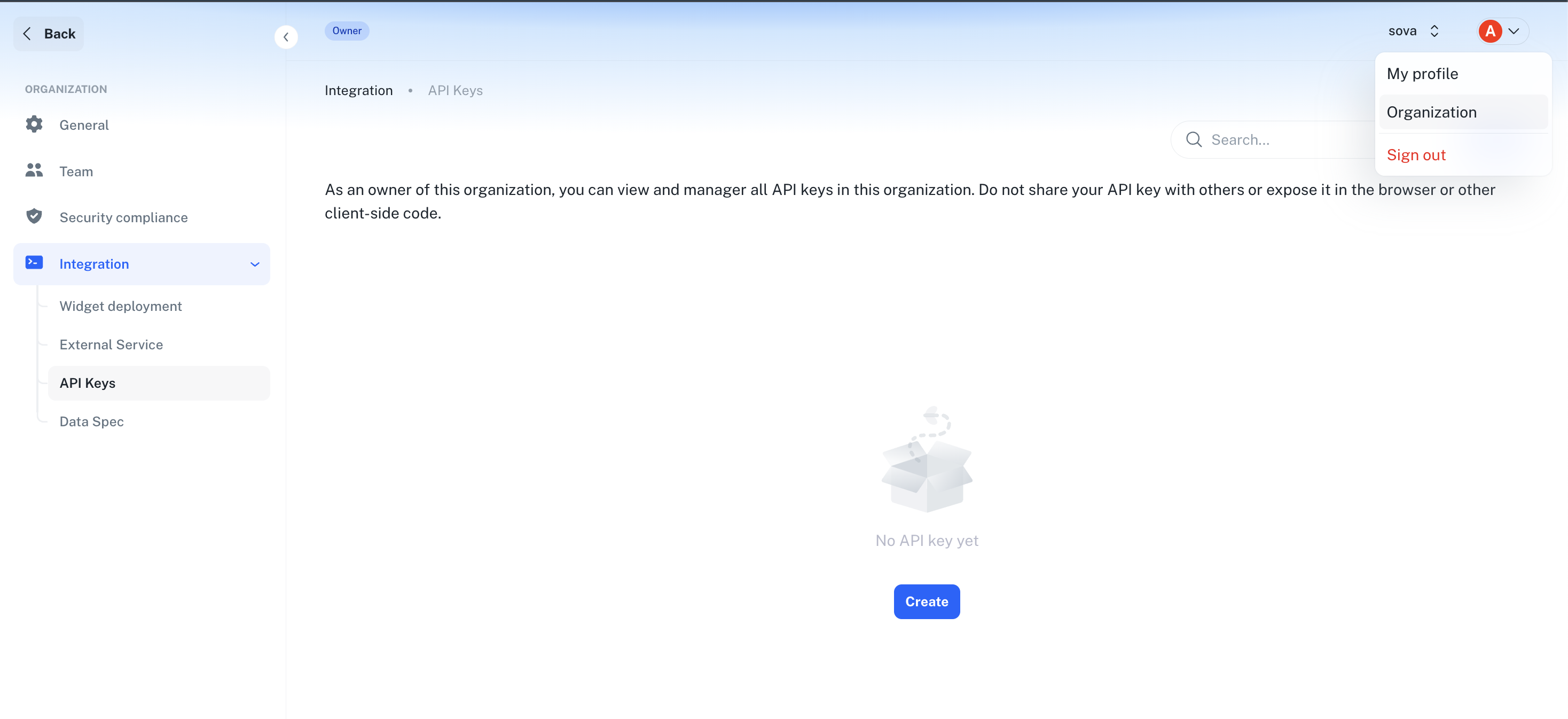
This key is used to authenticate your requests to parts of the Perxona Service APIs, i.e. Inbound Data, Conversations… You can obtain your API key from the Perxona Admin Portal under the API Keys section.
- [Header]
X-Inbound-Key

Agent Management #
These APIs are used to retrieve information about your agent profiles, which define the characteristics and behavior of your Perxona agents.
Get Agent Widget Profile By ID:
- [Endpoint]
/api/v1/services/profiles/widget-profiles/{agent_profile_id} (GET)
- [Authentication]
- The
X-API-Keyheader for authentication, where you provide the Deployment API Key.
- The
- [Description]
- Retrieves a specific agent profile designed for widget use, identified by
agent_profile_id.
- Retrieves a specific agent profile designed for widget use, identified by
- [Endpoint]
List Agent Profiles:
- [Endpoint]
/api/v1/services/profiles/agent-profiles (GET)
- [Authentication]
- The
X-API-Keyheader for authentication, where you provide the Deployment API Key.
- The
- [Description]
- Retrieves all agent profiles designed for use that are accessible with the provided API key.
- Returns agent profile information including
status(published, draft, suspend, etc.) to help you identify which profiles are ready for use.
- [Endpoint]
Check Deployment API Key/Session Token Validness:
- [Endpoint]
/api/v1/services/profiles/{agent_profile_id}/key-token/validness (GET)
- [Description]
- Checks if the provided API key or session token associated with an
agent_profile_idis still valid. - This endpoint validates the key/token provided in the
X-API-KeyorX-API-Tokenheaders. - This endpoint has a rate limit of 5 calls per second.
- Checks if the provided API key or session token associated with an
- [Endpoint]
Customer Data Management #
These API allow for the creation, updating, or retrieval of inbound data from external systems (or users) into Perxona plaform. This is useful for synchronizing information, such as customer data, which can be potentially used by your Perxona agents or other services within this platform.
Preparations #
- Step 1: Creating an Inbound Data API Key
Before you can use the endpoint to push or pull data, you must first generate an Inbound Data API Key. This key is used to authenticate your requests when sending data to the system or retrieving data from the system.
* Navigate to the API Keys section in the Perxona Admin Portal.
* You can use the generated key used in the X-Inbound-Key header for the data submission/retrieval endpoint.
NOTE: This key must be securely stored.
- Step 2: Create the Data Spec (schema for data submission)
After obtaining an Inbound API Key, and critically, before submitting your data, you must define how our intelligence system should interpret and structure the incoming information. This is done by creating an Inbound Data Spec, which essentially sets up a data schema.
* The Data Spec defines the structured data format for requests and responses. It allows users to specify the schema of objects, their fields, data types, and constraints via the UI. These definitions are used by the AI agent to parse incoming request payloads consistently and accurately.
* Purpose: Ensures all API endpoints exchange data in a predictable format.
* LLM Parsing: Provides a clear schema for the LLM to extract and validate information from incoming payloads.
* Integration: Facilitates format-free integration with external systems.
* This schema is vital as it enables our system to parse the submitted raw data, extract meaningful information, and then correctly store it within our platform for later use.


Submitting Your Inbound Data #
With the Inbound Key generated and the data schema (Data Spec) in place, you can now proceed to send your data.
Create or Update Inbound API Data (for example, Customer Data):
- [Endpoint]
/api/v1/services/data/{inbound_type} (PUT)
- [Authentication]
- Authentication is performed using the
X-Inbound-Keyheader, where you provide the Inbound Data API Key from Step 1.
- Authentication is performed using the
- [Schema]
- Request Body (JSON Array of Objects):
[
  {
    "external_reference_id": "string",
    "raw_content": "string"
  }
]
- Request Body (JSON Array of Objects):
- [Description]
- This endpoint is used to push your organization’s data into the Perxona platform.
- The
inbound_typein the path must correspond to aninbound_typefor which you have already created an Data Spec (schema) in Step 2. - The request body should be an array of data entries. Each entry must include an
external_reference_id(your unique identifier for that data record) and araw_content(the actual data as a string, typically formatted as JSON, which should conform to the schema defined in your Data Spec). - Based on the
external_reference_idandinbound_type, the system will either create new data records or update existing ones, structured according to your defined schema.
- [Endpoint]
Retrieving Data #
You can also retrieve various types of data stored within the Perxona platform using your Inbound API Key. This is useful for analytics, reporting, or integrating Perxona data back into your other systems.
Retrieve Customer Data:
- [Endpoint]
/api/v1/services/data/customers (GET)
- [Authentication]
- The
X-Inbound-Keyheader for authentication.
- The
- [Description]
- Fetches all inbound customer data associated with your organization’s Inbound API Key.
- Supports pagination (page, size), sorting (sort_by, direction), date range filtering (date_range_type, start_date, end_date), and searching (search_term, external_reference_id).
- [Endpoint]
Conversations #
You can manage conversations and messages within the Perxona platform using the following APIs. These endpoints allow you to retrieve conversation data and associated messages, which are essential for understanding user interactions with your agents.
Retrieve Conversations:
- [Endpoint]
/api/v1/services/data/conversations (GET)
- [Authentication]
- The
X-Inbound-Keyheader for authentication.
- The
- [Description]
- Allows you to retrieve a list of all conversation data linked to your organization’s Inbound API Key.
- Pagination parameters (page, size) are available to manage large datasets.
- You can sort the results using sort_by and direction (default is ascending by updated_at).
- Filtering options include search_term, date ranges (date_range_type, start_date, end_date, creation_start_at, creation_end_at), customer id and fingerprint.
- [Endpoint]
Retrieve Messages:
- [Endpoint]
/api/v1/services/data/messages (GET)
- [Authentication]
- The
X-Inbound-Keyheader for authentication.
- The
- [Description]
- Fetches all messages for a specific conversation.
- You must provide a conversation_id as a query parameter to specify which conversation’s messages you want to retrieve.
- Supports pagination (page, size) and sorting (sort_by, direction; default is ascending by updated_at).
- [Endpoint]
Associate Conversation with Customer:
- [Endpoint]
/api/v1/services/widget/conversation/{conversation_id} (PATCH)
- [Authentication]
- The
X-API-Keyheader for authentication.
- The
- [Schema]
- Request Body (JSON Object):
{
  "customer_id": "string"
}
- Request Body (JSON Object):
- [Description]
- This endpoint allows you to link a specific conversation to a customer in Perxona system.
- You need to provide the conversation_id in the path and include the customer_id in the request body.
- This association helps in tracking conversations related to specific customers for better context and service.
- [Endpoint]
Conversation Connect #
These APIs are used to establish and manage conversation connections with Perxona agents. They handle the initialization of new conversations and updating existing conversation settings.
Initialize Conversation:
- [Endpoint]
/api/v1/services/conversation (POST)
- [Authentication]
- The
X-API-Keyheader for authentication, where you provide the Deployment API Key.
- The
- [Schema]
- Request Body (JSON Object):
{ "id" (optional): "string", "agent_profile_id" (required): "string", "customer_ref_id" (optional): "string", "storyboard_id" (optional): "string", "language": "auto | en | zh | ja | ko | th | vi | id | ms | tl | hi | ar | es | fr | de | it | pt | ru | tr | pl | cs | hu | ro | bg | hr | sk | sl | et | lv | lt | fi | sv | no | da | is | mt | cy | ga | eu | ca | gl" } - [Request Body Fields]
id: The conversation ID for the conversation. If not provided, a new conversation will be created automatically with a generated ID.agent_profile_id: The agent profile ID that defines the characteristics and behavior of the Perxona agent for this conversation.customer_ref_id: The customer reference ID used to identify and associate the conversation with a specific customer for tracking and context purposes.storyboard_id: The storyboard ID that specifies a particular conversation flow or scenario to follow during the conversation.language: The language for the conversation. Defaults toautofor automatic language detection, or specify a specific language code.
- Response Body (JSON Object):
{ "id": "string", "lang": "auto | en | zh | ja | ko | th | vi | id | ms | tl | hi | ar | es | fr | de | it | pt | ru | tr | pl | cs | hu | ro | bg | hr | sk | sl | et | lv | lt | fi | sv | no | da | is | mt | cy | ga | eu | ca | gl", "history_messages": [ { "content": "string", "sender": "user | model | sova | tool | undefined" } ] } - [Response Body Fields]
id: The unique identifier for the conversation.lang: The language setting for the conversation.history_messages: Array of previous messages in the conversation, each containing:content: The message text content.sender: The sender type of the message:user: User input messagemodel: Model output message (AI agent response)sova: SOVA message (contains user prompt or system prompt)tool: Tool output from either an outbound API call or a SOVA-provided toolundefined: Undefined sender type
- Request Body (JSON Object):
- [Description]
- This endpoint establishes a new conversation connection with a Perxona agent or retrieves an existing conversation if the conversation ID is provided.
- If no conversation ID is provided, a new conversation will be created automatically.
- The
agent_profile_idspecifies which agent profile to use for the conversation. - The
customer_ref_idcan be used to associate the conversation with a specific customer for tracking purposes. - The
storyboard_idallows you to specify a particular conversation flow or scenario. - The
languageparameter sets the conversation language (defaults toautofor automatic detection). - Returns the conversation ID, language setting, and any existing message history.
- [Endpoint]
Update Conversation Connection:
- [Endpoint]
/api/v1/services/widget/conversation/{conversation_id} (PATCH)
- [Authentication]
- The
X-API-Keyheader for authentication.
- The
- [Schema]
- Request Body (JSON Object):
{ "lang" (optional): "auto | en | zh | ja | ko | th | vi | id | ms | tl | hi | ar | es | fr | de | it | pt | ru | tr | pl | cs | hu | ro | bg | hr | sk | sl | et | lv | lt | fi | sv | no | da | is | mt | cy | ga | eu | ca | gl", "customer_id" (optional): "string" } - [Request Body Fields]
lang: The language for the conversation. Specify a specific language code or leave empty to keep current language setting.customer_id: The customer ID to associate with the conversation for tracking and context purposes.
- Response Body (JSON Object):
{
  "id": "string",
  "lang": "auto | en | zh | ja | ko | th | vi | id | ms | tl | hi | ar | es | fr | de | it | pt | ru | tr | pl | cs | hu | ro | bg | hr | sk | sl | et | lv | lt | fi | sv | no | da | is | mt | cy | ga | eu | ca | gl"
}
- Request Body (JSON Object):
- [Description]
- This endpoint allows you to update the settings of an existing conversation.
- You can modify the conversation language or associate it with a customer ID.
- The
conversation_idin the path specifies which conversation to update. - Both
langandcustomer_idparameters are optional - only provided fields will be updated.
- [Endpoint]
WebSocket Conversation Connection:
- [Endpoint]
/api/v1/ws/conversation/{conversation_id} (WebSocket)
- [Authentication]
- The
X-API-Keyheader for authentication, where you provide the Deployment API Key.
- The
- [Connection Parameters]
- The WebSocket connection requires the following client information:
apikey(optional): The Organization API key of the clientfingerprint(required): The client fingerprint - unique identifier for the client session must be exactly 32 characterscid(optional): The de-identification client ID from the Organization - used for customer identificationtoken(optional): The bearer token from the client - for additional authenticationsession_token(optional): The session token from the client - for session-based authentication
- The WebSocket connection requires the following client information:
- [Description]
- This WebSocket endpoint establishes a real-time conversation connection with a Perxona agent.
- The
conversation_idin the path specifies which conversation to connect to. - This endpoint enables bidirectional communication for real-time chat interactions.
- The connection supports streaming responses and can handle various message types including chat responses and panel transitions.
- The WebSocket connection will automatically close after a period of inactivity based on organization settings.
- [WebSocket Messages]
- Incoming Event Type: The WebSocket will receive messages from the client with the following event types:
user_input: User input messageping: Ping message to keep connection alive
- Outgoing Event Type: The WebSocket will send real-time responses to the client with the following event types:
user_input: User input messageagent_answer: Agent is responding (streaming response)agent_end: Agent has finished respondingpong: Response to ping messageidle_timeout: Connection timeout due to inactivitypanel_transition: Panel transition notification when conversation flow changeserror: Error occurred during the conversation
- Incoming Event Type: The WebSocket will receive messages from the client with the following event types:
- [Connection Management]
- The WebSocket connection includes automatic idle timeout handling
- Error handling with appropriate WebSocket status codes
- Graceful disconnection handling
- Support for proactive agent greetings based on conversation state
- [Endpoint]